Welcome to OCS Inventory NG community support, where you can ask questions and receive answers from other members of the community.

Please ask questions only in English or French.

Release 2.12.3 available

The official documentation can be found on https://wiki.ocsinventory-ng.org. Read it before asking your question.

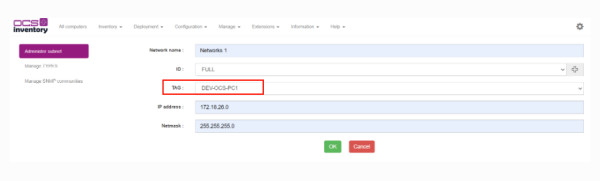
TAG option does not appear on Administer subnet

Hello everyone,

i have a question i wanted to automatically add devices in a subnet to get a specific tag and i thought i do that with network scan but i dont have the tag option like in the documentation its shown to be there i set the IP_DISCOVERY_LINK_TAG_NETWORK to 1 still no change and the admin user is sadmin.

Maybe someone can help or can tell me the right way to do it if this is the wrong way to apply tags i know i can do it manually but that would take way too long.

in OCS Inventory NG server for Unix by (180 points)

2 Answers

0 votes
Click Here's for Call me by clicking here and I can help. https://wa.me/5562994108188

Click Here's my free OCS course. https://www.youtube.com/watch?v=7TZusmn_xHc&list=PL3bg0UWF3RTtAql0hZjFXok-Vei8AjejU
by (620 points)
0 votes

Your issue is not due to a configuration error, but rather because OCS Inventory NG does not support automatic tag assignment via network scanning in the way you assumed—the `IP_DISCOVERY_LINK_TAG_NETWORK` option does not actually function in that manner (or it has been deprecated/does not apply to subnets bitlife).

ago by (140 points)
 
Powered by Question2Answer
...